AI Camping Gear Photography & Background Generator for Outdoor Retailers
Aspect Ratio:
Select Background Prompt
Image Scale:
Controls how much of the canvas your image will occupy. Smaller percentages create more padding around your image.
Your content will remain private and only visible to you
Preview
Preview
Your image will appear here
Please Generate an image to display the preview
Product Background Generator
Put a product photo into a new AI-made scene, then download it for your store, listing or social post.
Overview
Upload a product photo. The tool cuts the product out, you place it on the canvas and pick one of the ready-made scenes, and the AI builds that scene around the product. Each scene is written to give the product a matching surface and a shadow underneath, so it does not look pasted on.
- •More than 100 ready-made scenes, from plain white and studio light boxes to marble, wood, nature and seasonal sets
- •15 frame shapes, including 1:1, 4:5, 9:16 and 16:9
- •Place, resize and zoom the cut-out product before you generate
- •Bulk mode: up to 10 photos in one run, each with its own scene and settings
Camping gear photography
Camping gear is made for rough places, but online it has to look clear and trustworthy. Tents are big, stoves are fiddly, sleeping bags are lumpy and every item has a pack size that shoppers want to know. Many sellers photograph on the lawn, where grass and shadows mix with the product. Shoot on a flat, light surface where you can, and for large items pick a wide frame. Place the finished subject on a clean background, then add pictures of packed size, fabric and fittings.
Tips
Show packed and unpacked states
Hikers care about weight and bulk. Photograph the tent or bag in its sack beside a familiar object, then laid out ready for use, so people can judge both.
Photograph zips, poles and seams
Close-ups of fasteners and stitching tell outdoor buyers about durability. A sharp image of a zip or a taped seam answers questions that a spec list leaves open.
Use accurate color
Greens and oranges change under shade or direct sun. Shoot in open shade with even light, and check that the tent or jacket color matches what customers will receive.
Features
Automatic cut-out
The background of your photo is removed for you, so the product is ready to place on a new scene.
Scene picker
Choose a scene from the thumbnails. Each one is a written scene the AI builds around your product, with a surface and a shadow under it.
Placement and scale
In Advanced mode, drag, resize and zoom the product on the canvas. In Easy mode, set the image scale in 10% steps.
Bulk mode
Add up to 10 photos in one run. Each card has its own scene, scale and frame shape.
How It Works
Upload your product
Click or drag a photo in. The background is removed automatically.
Place it
Pick a frame shape, then set the size and position of the product.
Pick a scene
Choose one of the ready-made scenes from the thumbnails.
Generate and download
The AI builds the scene around your product. Download the result from the preview.
Before and after examples
Two product photos before and after a new background: a cluttered desk photo turned into a clean white packshot, and a plain backdrop turned into a lifestyle scene.
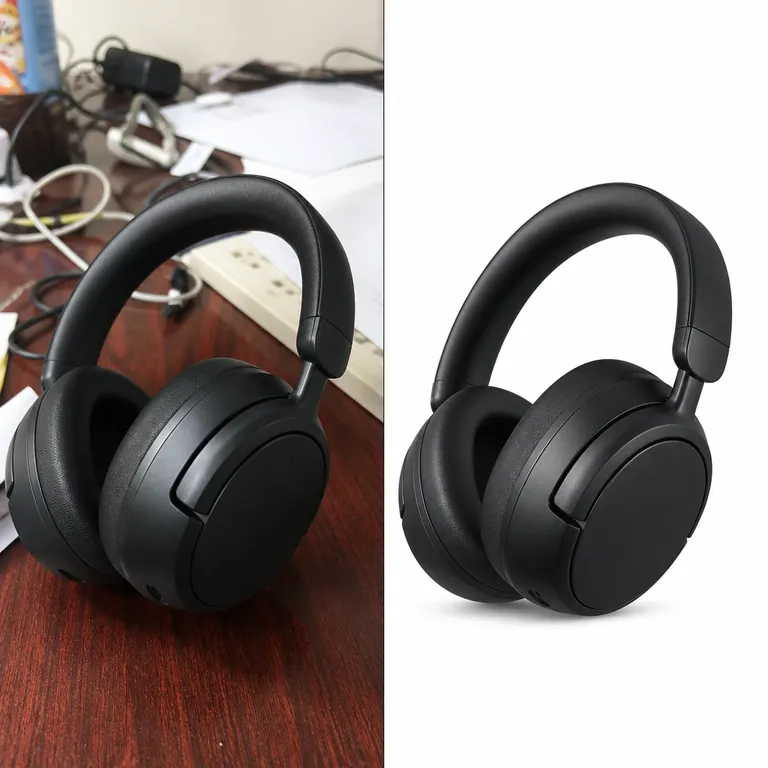
Cluttered desk photo → white ecommerce packshot
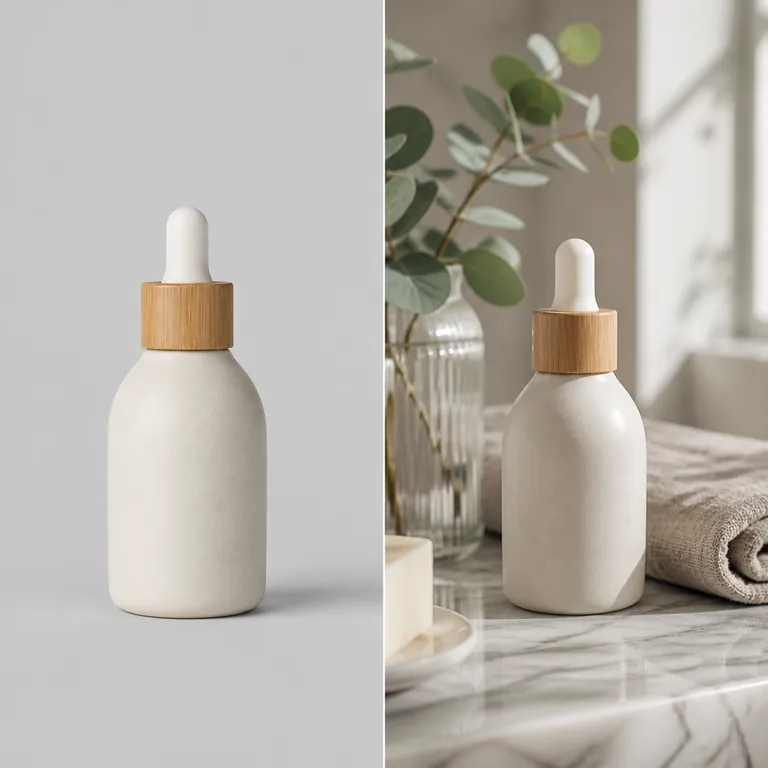
Plain backdrop → lifestyle bathroom scene
Use Cases
Store and marketplace listings
Give a set of products the same backdrop so the catalog looks consistent.
Key Benefits:
- •Plain white and light box scenes for main images
- •One scene reused across a whole range
- •No studio or reshoot needed for a new backdrop
Seasonal and campaign images
Put the same product into autumn, winter or holiday scenes for a sale or a launch.
Key Benefits:
- •Seasonal and nature scenes in the picker
- •Keep your original photo, change only the scene
- •Make several versions from one upload
Social posts
Pick the frame shape for the place you post before you generate.
Key Benefits:
- •Square and 4:5 for feeds
- •9:16 for stories and reels
- •16:9 for banners and headers
Frequently Asked Questions
More product photography guides
The main product background generator, plus guides for similar products and stores.
- Product background generator
Put any product photo into a new AI-made scene: white, studio, marble, wood, nature or seasonal.
- Wellness product photography
Market your wellness products effectively with our AI background changer designed for health brands.
- Home office product photography
Market your office products effectively with our AI background changer designed for the modern workspace.
- DIY tool photography
Boost sales of your hardware products with our AI background changer designed specifically for tools.
- Sustainable product photography
Communicate your environmental values with our AI background changer designed for sustainable products.
- Custom T-shirt photography
Market your custom apparel effectively with our AI background changer designed for t-shirt businesses.
- Baby product photography
Build trust with parents through our AI background changer designed specifically for baby products.