AI Product Photography & Background Changer for Amazon Outdoor Product Sellers
Aspect Ratio:
Select Background Prompt
Image Scale:
Controls how much of the canvas your image will occupy. Smaller percentages create more padding around your image.
Your content will remain private and only visible to you
Preview
Preview
Your image will appear here
Please Generate an image to display the preview
Product Background Generator
Put a product photo into a new AI-made scene, then download it for your store, listing or social post.
Overview
Upload a product photo. The tool cuts the product out, you place it on the canvas and pick one of the ready-made scenes, and the AI builds that scene around the product. Each scene is written to give the product a matching surface and a shadow underneath, so it does not look pasted on.
- •More than 100 ready-made scenes, from plain white and studio light boxes to marble, wood, nature and seasonal sets
- •15 frame shapes, including 1:1, 4:5, 9:16 and 16:9
- •Place, resize and zoom the cut-out product before you generate
- •Bulk mode: up to 10 photos in one run, each with its own scene and settings
Amazon outdoor product photography
Outdoor gear is bought for conditions that photos cannot show, so images need to answer practical questions. How big is it when packed, how does it set up, what is it made of? Tents, bottles, packs and tools are large, reflective or awkward to photograph, and a garage backdrop does not inspire confidence. The Amazon main image should be the product on white. Use later images for packed size, features and an outdoor setting, where the adventurous mood belongs.
Tips
Show packed and unpacked
Take one photo of the gear in its carry bag and one set up. Outdoor buyers think about weight and space, so seeing both states answers a key worry quickly.
Use outdoor backdrops for secondary images
A forest, trail or mountain background suggests the intended use. Keep these for later slots and make sure the item looks the same as the white-background version.
Be accurate on color and finish
Camouflage, earth tones and technical fabrics shift under different lights. Photograph in daylight and check the color on your screen so the listing matches what arrives.
Features
Automatic cut-out
The background of your photo is removed for you, so the product is ready to place on a new scene.
Scene picker
Choose a scene from the thumbnails. Each one is a written scene the AI builds around your product, with a surface and a shadow under it.
Placement and scale
In Advanced mode, drag, resize and zoom the product on the canvas. In Easy mode, set the image scale in 10% steps.
Bulk mode
Add up to 10 photos in one run. Each card has its own scene, scale and frame shape.
How It Works
Upload your product
Click or drag a photo in. The background is removed automatically.
Place it
Pick a frame shape, then set the size and position of the product.
Pick a scene
Choose one of the ready-made scenes from the thumbnails.
Generate and download
The AI builds the scene around your product. Download the result from the preview.
Before and after examples
Two product photos before and after a new background: a cluttered desk photo turned into a clean white packshot, and a plain backdrop turned into a lifestyle scene.
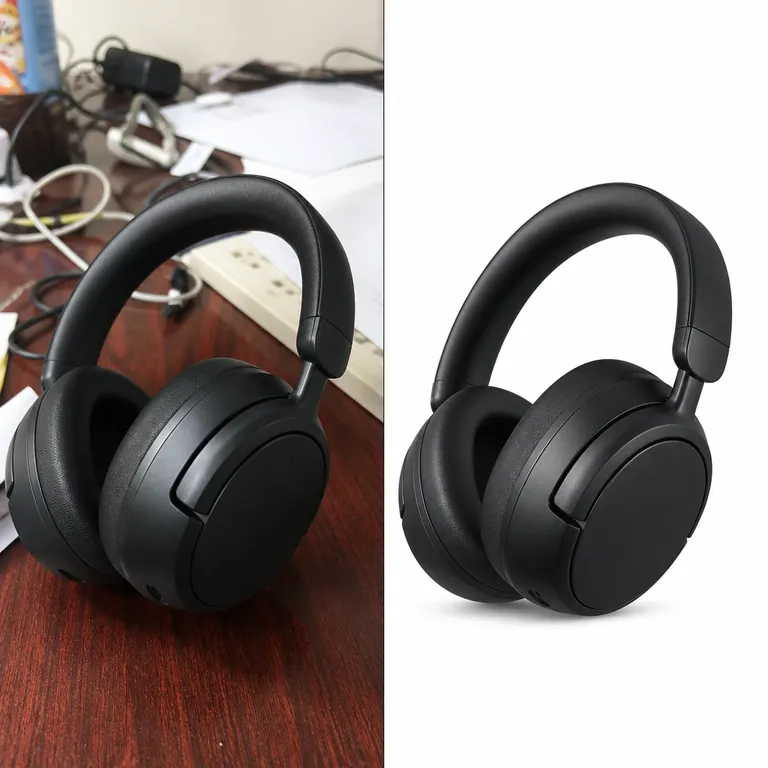
Cluttered desk photo → white ecommerce packshot
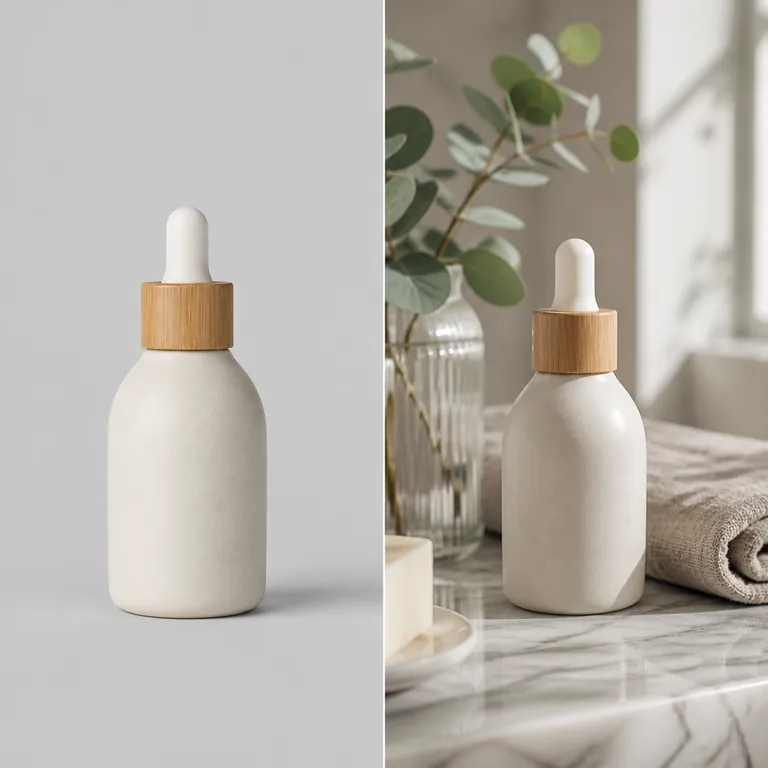
Plain backdrop → lifestyle bathroom scene
Use Cases
Store and marketplace listings
Give a set of products the same backdrop so the catalog looks consistent.
Key Benefits:
- •Plain white and light box scenes for main images
- •One scene reused across a whole range
- •No studio or reshoot needed for a new backdrop
Seasonal and campaign images
Put the same product into autumn, winter or holiday scenes for a sale or a launch.
Key Benefits:
- •Seasonal and nature scenes in the picker
- •Keep your original photo, change only the scene
- •Make several versions from one upload
Social posts
Pick the frame shape for the place you post before you generate.
Key Benefits:
- •Square and 4:5 for feeds
- •9:16 for stories and reels
- •16:9 for banners and headers
Frequently Asked Questions
More product photography guides
The main product background generator, plus guides for similar products and stores.
- Product background generator
Put any product photo into a new AI-made scene: white, studio, marble, wood, nature or seasonal.
- Amazon home decor product photography
Help customers visualize your home decor products with our AI background replacement tool.
- Amazon beauty product photography
Make your beauty products stand out on Amazon with our AI background generator that creates clean, professional product images.
- Amazon toys product photography
Boost your toy sales on Amazon with our AI background generator that creates appealing, professional product images.
- Amazon kitchen product photography
Increase conversion rates for your kitchen products on Amazon with our AI background generator.
- Amazon electronics product photography
Maximize your tech product sales on Amazon with our AI background generator that creates clean, professional product images.
- Amazon handmade jewelry product photography
Make your handcrafted jewelry stand out on Amazon Handmade with our AI background generator.