AI Action Figure Photography & Background Generator for Toy Collectors
Aspect Ratio:
Select Background Prompt
Image Scale:
Controls how much of the canvas your image will occupy. Smaller percentages create more padding around your image.
Your content will remain private and only visible to you
Preview
Preview
Your image will appear here
Please Generate an image to display the preview
Product Background Generator
Put a product photo into a new AI-made scene, then download it for your store, listing or social post.
Overview
Upload a product photo. The tool cuts the product out, you place it on the canvas and pick one of the ready-made scenes, and the AI builds that scene around the product. Each scene is written to give the product a matching surface and a shadow underneath, so it does not look pasted on.
- •More than 100 ready-made scenes, from plain white and studio light boxes to marble, wood, nature and seasonal sets
- •15 frame shapes, including 1:1, 4:5, 9:16 and 16:9
- •Place, resize and zoom the cut-out product before you generate
- •Bulk mode: up to 10 photos in one run, each with its own scene and settings
Action figure photography for collectors and toy shops
Action figures are small, posed and full of tiny parts. Collectors look at paint quality, joints, accessories and packaging. Sellers photograph figures in or out of the box, often on a cluttered shelf. Plastic and paint reflect light, and a shiny blister pack hides the toy behind glare. Use soft light, keep the figure steady on a stand or putty, and take the shot at eye level. Then swap the shelf for a clean backdrop. Show every accessory and mark, since completeness drives the price.
Tips
Pose at eye level
Shoot straight at the figure's face and chest height, which makes it look lifelike. A high angle makes toys look small and flat. Keep the lens close to the shelf level.
Lay out every accessory
Weapons, hands, stands and spare heads belong in one photo. Collectors check these against the original list, and missing parts reduce the value. Keep each piece clear of the others.
Photograph boxed items from several sides
Mint-in-box figures are judged by their packaging. Take clear pictures of every corner, the window and the back card, and mention any dents or shelf wear.
Features
Automatic cut-out
The background of your photo is removed for you, so the product is ready to place on a new scene.
Scene picker
Choose a scene from the thumbnails. Each one is a written scene the AI builds around your product, with a surface and a shadow under it.
Placement and scale
In Advanced mode, drag, resize and zoom the product on the canvas. In Easy mode, set the image scale in 10% steps.
Bulk mode
Add up to 10 photos in one run. Each card has its own scene, scale and frame shape.
How It Works
Upload your product
Click or drag a photo in. The background is removed automatically.
Place it
Pick a frame shape, then set the size and position of the product.
Pick a scene
Choose one of the ready-made scenes from the thumbnails.
Generate and download
The AI builds the scene around your product. Download the result from the preview.
Before and after examples
Two product photos before and after a new background: a cluttered desk photo turned into a clean white packshot, and a plain backdrop turned into a lifestyle scene.
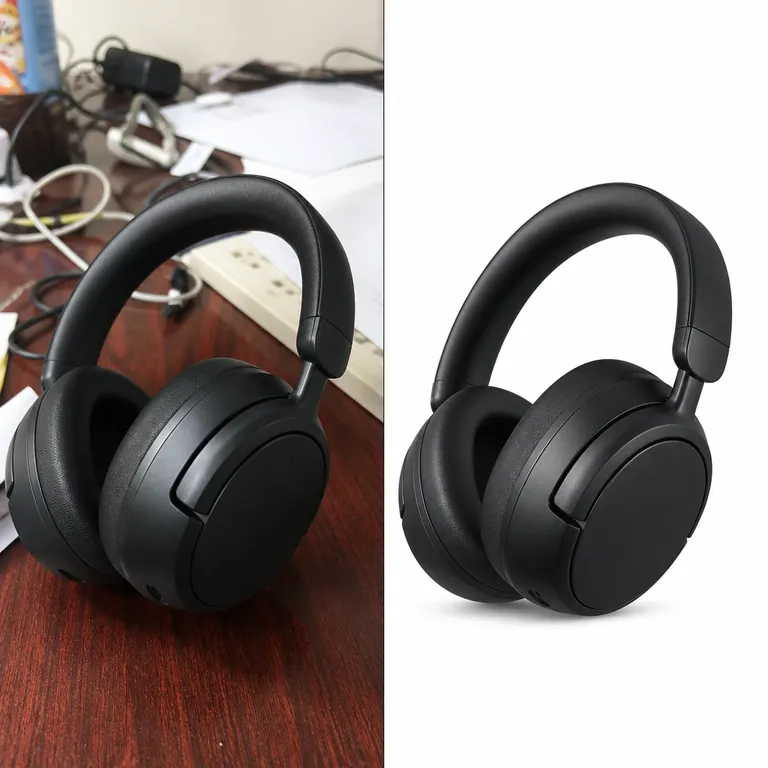
Cluttered desk photo → white ecommerce packshot
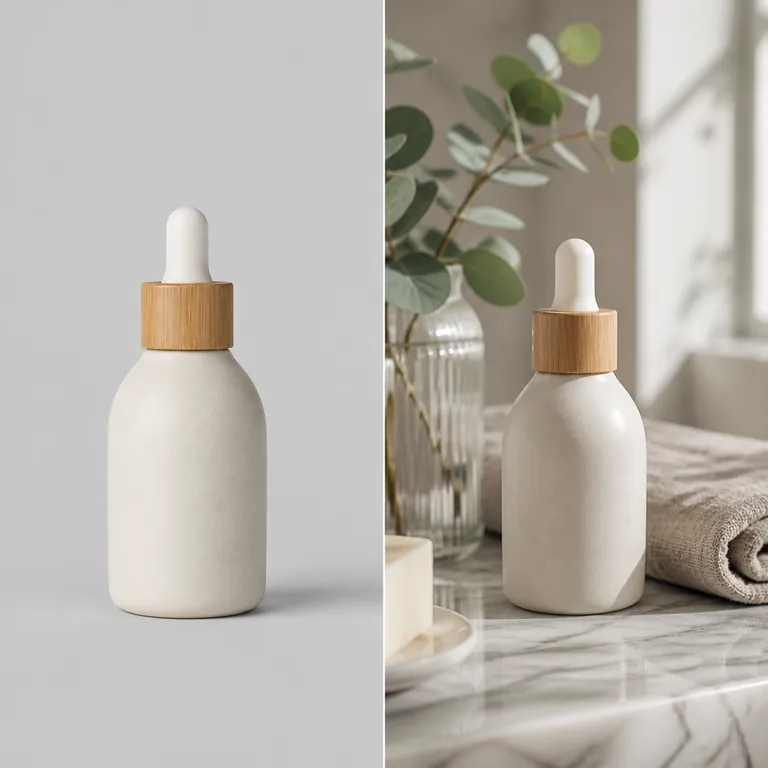
Plain backdrop → lifestyle bathroom scene
Use Cases
Store and marketplace listings
Give a set of products the same backdrop so the catalog looks consistent.
Key Benefits:
- •Plain white and light box scenes for main images
- •One scene reused across a whole range
- •No studio or reshoot needed for a new backdrop
Seasonal and campaign images
Put the same product into autumn, winter or holiday scenes for a sale or a launch.
Key Benefits:
- •Seasonal and nature scenes in the picker
- •Keep your original photo, change only the scene
- •Make several versions from one upload
Social posts
Pick the frame shape for the place you post before you generate.
Key Benefits:
- •Square and 4:5 for feeds
- •9:16 for stories and reels
- •16:9 for banners and headers
Frequently Asked Questions
More product photography guides
The main product background generator, plus guides for similar products and stores.
- Product background generator
Put any product photo into a new AI-made scene: white, studio, marble, wood, nature or seasonal.
- Bakery product photography
Market your baked goods effectively with our AI background changer designed for bakeries.
- Fitness equipment photography
Market your fitness products effectively with our AI background changer designed for exercise equipment.
- Handmade furniture photography
Highlight the craftsmanship of your furniture with our AI background changer designed specifically for custom woodworking.
- Vinyl record photography
Sell vinyl records more effectively with our AI background changer designed for music collectibles.
- Small business product photography
Compete with larger brands using our AI background changer designed for small businesses.
- Handcrafted pottery photography
Highlight the craftsmanship of your ceramic pieces with our AI background changer designed specifically for pottery.